Modern laptops look sleek.
However, they often come with just one or two ports.
As a result, users struggle daily—charging the laptop, connecting a monitor, transferring data, or reading memory cards becomes a juggling act.
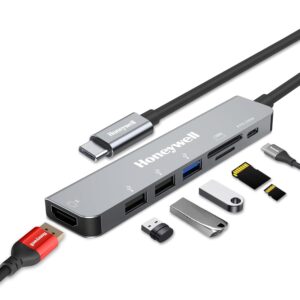
That’s exactly where the 👉 Honeywell 7-in-1 TypeC Docking Station 👈 changes everything.
Instead of carrying multiple adapters, you get one compact hub that handles power, display, data, and storage—all at once.
Let’s break it down properly.
What Is the Honeywell 7-in-1 Type-C Docking Station?
The 👉 Honeywell 7-in-1 TypeC Docking Station 👈 is a multi-port USB-C hub designed to expand a single Type-C port into seven essential ports.
In other words, it turns your laptop into a full-fledged workstation within seconds.
Moreover, it supports plug-and-play functionality, meaning no drivers, no setup, and no learning curve.
Ports & Connectivity: What Do You Actually Get?
Let’s clearly understand all 7 ports and how they help in real life.
🔹 1 × HDMI Port (4K UHD)
-
Supports up to 3840×2160 @ 30Hz
-
Mirror or extend your display
-
Works with monitors, TVs, and projectors
🔹 1 × USB-C 3.0 PD Charging Port
-
Supports 100W Power Delivery
-
Charges your laptop while using other ports
-
Fast Role Swap PD 3.0 protects devices from voltage fluctuations
🔹 1 × USB 3.0 Port
-
Data transfer speed up to 5 Gbps
-
Ideal for external hard drives and SSDs
🔹 2 × USB 2.0 Ports
-
Data transfer speed up to 480 Mbps
-
Perfect for keyboard, mouse, printer, pendrive
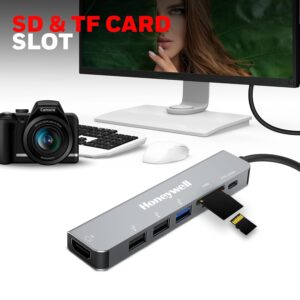
🔹 SD Card Slot
-
Ultra high-speed access
-
Great for photographers and editors
🔹 Micro SD Card Slot
-
Supports quick media access
-
Ideal for phones, action cameras, drones
Why Choose Honeywell Over Other Type-C Hubs?
You’ll find many USB-C hubs online.
However, very few match Honeywell’s reliability.
✅ Brand Trust
-
10+ years on Amazon
-
91% positive ratings
-
10K+ customer reviews
-
50K+ recent orders
Clearly, users trust this brand.
Real-World Use Cases (Where This Hub Shines)
The 👉 Honeywell 7-in-1 TypeC Docking Station 👈 fits effortlessly into multiple lifestyles.
💼 Office & Work-From-Home
-
Connect external monitor via HDMI
-
Use keyboard, mouse, printer simultaneously
-
Charge laptop at full speed
🎓 Students & Online Learners
-
Present slides on projector
-
Use pendrive + mouse together
-
Read SD cards for assignments
ALSO READ:  Still Using CDs & DVDs? This HP External USB DVD-RW Drive Is a Hidden Gem for Laptops
🎬 Content Creators & Editors
-
Transfer photos from SD cards instantly
-
Edit videos on a bigger screen
-
Keep laptop charging during heavy workloads
✈️ Travelers & Digital Nomads
-
Lightweight and compact
-
Replaces multiple adapters
-
One hub, zero clutter
Design & Build Quality
Honeywell kept the design minimal, premium, and practical.
-
Silver metallic finish
-
Compact and travel-friendly
-
Strong Type-C cable
-
Heat-resistant body
As a result, it blends perfectly with MacBooks and premium laptops.
Performance & Stability
Performance is where the 👉 Honeywell 7-in-1 TypeC Docking Station 👈 truly excels.
-
HDMI output remains stable
-
No lag during 4K playback
-
Charging remains consistent
-
Hot swap works smoothly
Even during multitasking, the hub stays reliable.
Compatibility: Will It Work With Your Device?
✔ Compatible Devices
-
MacBook / MacBook Pro
-
Windows laptops
-
PCs with USB-C
-
Thunderbolt 3 devices
-
Tablets & smartphones with Type-C
⚠️ Important Note
Your device must support Display Output via USB-C for HDMI to work.
Special Features That Matter
-
Plug & Play – No drivers required
-
Hot Swap Support – Connect or disconnect anytime
-
Fast Role Swap PD 3.0 – Power protection
-
3-Year Manufacturer Warranty – Rare in this category
Pros and Cons (Honest Opinion)
👍 Pros
-
7 ports in one compact hub
-
100W fast PD charging
-
4K HDMI support
-
Wide device compatibility
-
Strong brand trust
-
Long warranty period
👎 Cons
-
HDMI limited to 30Hz at 4K
-
No Ethernet port
Still, for most users, these are minor trade-offs.
Final Verdict: Is It Worth Buying?
Without any doubt—yes.
The 👉 Honeywell 7-in-1 TypeC Docking Station 👈 is a smart investment for anyone using modern laptops with limited ports.
It simplifies your workspace, boosts productivity, and eliminates adapter chaos.
Sometimes, one good accessory makes all the difference—and this is one of them.